Ten Hours, One Click, Almost Gone: Obsidian Plugin, iCloud Recovery, and a Small Lesson
TL;DR
Last week I was writing an Obsidian plugin. After about ten hours of work, I was close to a version I could actually use.
Then a small distraction turned into a big problem.
In a few seconds, my plugin folder disappeared. No drama, no complex bug — just a couple of quick clicks made while my brain was in “fix it fast” mode.
This is the story of what happened, how iCloud Data Recovery saved me, and why I changed my workflow right after.
What I was building
I’ve been using Obsidian for a long time. Besides regular note-taking, I also track a personal metric related to health and breathing quality.
My idea was:
- Store daily metric values inside daily notes, in the frontmatter
- Run periodic analysis and generate simple recommendations
- Draw a custom Bases view that fits my workflow better than a generic table
So I started building a plugin around this. I kept it private, because it’s personal, and I don’t want to over-polish it or publish it yet. But technically, it was already “real”: TypeScript, a build pipeline, and a working prototype.
And then I made a change that triggered everything.
Why it went wrong
In Obsidian plugins, manifest.json is not just a random config file. It’s part of how Obsidian identifies and loads a plugin.
During quick experiments, I changed the plugin name in manifest.json.
When I went back to Obsidian, my plugin appeared twice. At that moment I assumed it was just a temporary state problem — something like “Obsidian UI got confused” while I was iterating quickly.
So I did what many of us do when we see duplicate entries: I clicked Delete on one of them.
That was the real mistake.
Because I was following the Developer Docs–style setup, my whole development codebase lived inside the vault under .obsidian/plugins/.... So deleting “the plugin” was not just uninstalling a build artifact. It removed the actual source folder.
I commit often, but I hadn’t pushed yet.
So it felt like watching ten hours fly away.
The recovery moment: iCloud.com Data Recovery
First, I checked the Trash. Nothing.
Then I checked iCloud “Recently Deleted”. Still nothing.
I was stressed and moving fast, clicking around iCloud.com with that mix of panic and anger — and I randomly found a section called Data Recovery.
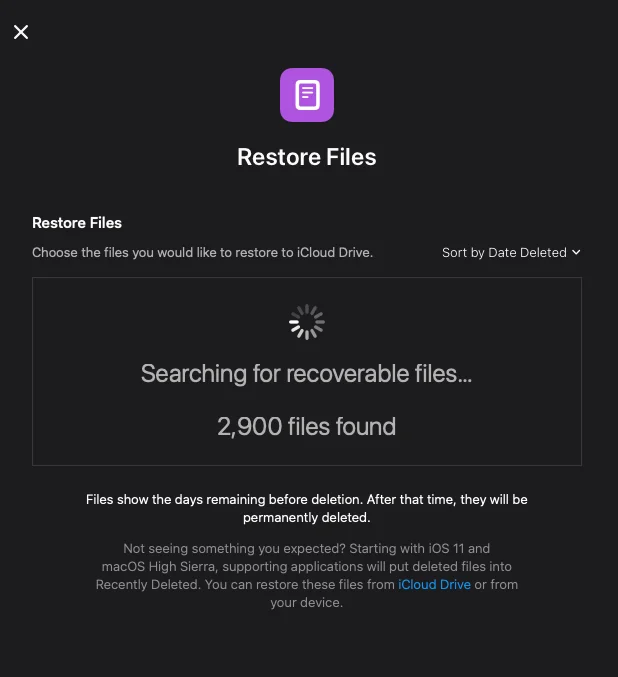
It showed a message like “thousands of recoverable files”. I opened it, and I saw entries marked as deleted just minutes ago.
That was it. My files were there.
But there was another problem: the list wasn’t just my plugin code.
Because my plugin folder also contained node_modules and .git, the recovery list was huge. Thousands of files. And I only cared about maybe 5–10 real artifacts.
The semi-technical trick: scripting a virtualized list
I decided to speed things up with a small script in Safari DevTools.
My first plan was full automation: detect the items under my plugin path and auto-select them. But it didn’t work reliably.
The reason is how Apple built that recovery UI: it looks like a long list, but it’s not actually rendering thousands of DOM nodes at the same time. It uses a common performance pattern called list virtualization.
In short:
- The modal only keeps a small set of rows in the DOM
- When you scroll, the UI reuses the same row elements
- The “path text” and other values update dynamically inside those reused nodes
So a script that “selects everything matching X” can fail because the element you marked might later represent a totally different file after scrolling.
Once I realized this, I changed the approach.
Instead of trying to select items programmatically, I turned the script into a visual helper:
- Files under my target prefix got a green border
- Everything else got a red border
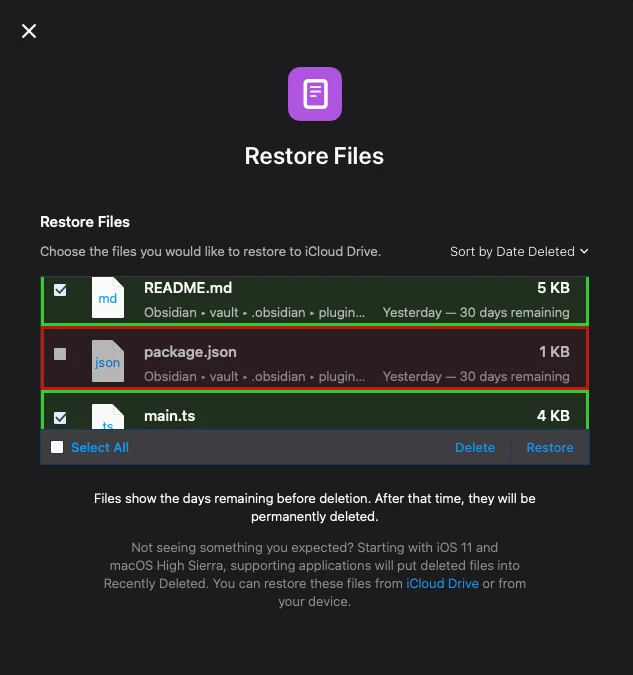
Then I manually scrolled through the list and checked only the green ones. It wasn’t perfect, but it was stable. After 15–20 minutes of scrolling and selecting, I restored the files.
And the code was back (without the heavy folders, which I didn’t need anyway).
What I changed immediately
After recovery, I didn’t continue development. First, I fixed the workflow.
I moved the project out of the vault into my normal workspace and treated the vault as a runtime target, not a source of truth.
I also added a packaging flow so only the small output set ends up in the vault.
My scripts ended up like this:
"scripts": {
  "build": "tsc -noEmit -skipLibCheck && node esbuild.config.mjs production",
  "build:dev": "tsc -noEmit -skipLibCheck && node esbuild.config.mjs development",
  "package": "npm run package:prod",
  "package:prod": "npm run build && node package-plugin.mjs",
  "package:dev": "npm run build:dev && node package-plugin.mjs"
}"scripts": {
"build": "tsc -noEmit -skipLibCheck && node esbuild.config.mjs production",
"build:dev": "tsc -noEmit -skipLibCheck && node esbuild.config.mjs development",
"package": "npm run package:prod",
"package:prod": "npm run build && node package-plugin.mjs",
"package:dev": "npm run build:dev && node package-plugin.mjs"
}And the packaging script basically copies only what matters:
import { promises as fs } from "fs";
import path from "path";
import { fileURLToPath } from "url";

const __filename = fileURLToPath(import.meta.url);
const __dirname = path.dirname(__filename);

async function ensureDir(dir) {
  await fs.mkdir(dir, { recursive: true });
}

async function removeDir(dir) {
  await fs.rm(dir, { recursive: true, force: true });
}

async function fileExists(filePath) {
  try {
    await fs.access(filePath);
    return true;
  } catch {
    return false;
  }
}

async function copyFile(source, destination) {
  await fs.copyFile(source, destination);
}

async function main() {
  const manifestPath = path.join(__dirname, "manifest.json");
  const manifest = JSON.parse(await fs.readFile(manifestPath, "utf8"));
  const pluginId = manifest.id;

  if (!pluginId || typeof pluginId !== "string") {
    throw new Error("Unable to determine plugin id from manifest.json");
  }

  const releaseRoot = path.join(__dirname, "release");
  const outputDir = path.join(releaseRoot, pluginId);

  await removeDir(outputDir);
  await ensureDir(outputDir);

  const artifacts = [
    { file: "manifest.json", required: true },
    { file: "main.js", required: true },
    { file: "styles.css", required: false },
  ];

  for (const artifact of artifacts) {
    const source = path.join(__dirname, artifact.file);
    if (!(await fileExists(source))) {
      if (artifact.required) {
        throw new Error(
          `Missing required artifact: ${artifact.file}. Did you run npm run build?`
        );
      }
      continue;
    }

    const destination = path.join(outputDir, artifact.file);
    await copyFile(source, destination);
  }

  console.log(`Plugin packaged at ${path.relative(__dirname, outputDir)}`);
  console.log("Copy this folder into <vault>/.obsidian/plugins to test the build.");
}

main().catch((error) => {
  console.error(error);
  process.exit(1);
});
import { promises as fs } from "fs";
import path from "path";
import { fileURLToPath } from "url";
const __filename = fileURLToPath(import.meta.url);
const __dirname = path.dirname(__filename);
async function ensureDir(dir) {
await fs.mkdir(dir, { recursive: true });
}
async function removeDir(dir) {
await fs.rm(dir, { recursive: true, force: true });
}
async function fileExists(filePath) {
try {
await fs.access(filePath);
return true;
} catch {
return false;
}
}
async function copyFile(source, destination) {
await fs.copyFile(source, destination);
}
async function main() {
const manifestPath = path.join(__dirname, "manifest.json");
const manifest = JSON.parse(await fs.readFile(manifestPath, "utf8"));
const pluginId = manifest.id;
if (!pluginId || typeof pluginId !== "string") {
throw new Error("Unable to determine plugin id from manifest.json");
}
const releaseRoot = path.join(__dirname, "release");
const outputDir = path.join(releaseRoot, pluginId);
await removeDir(outputDir);
await ensureDir(outputDir);
const artifacts = [
{ file: "manifest.json", required: true },
{ file: "main.js", required: true },
{ file: "styles.css", required: false },
];
for (const artifact of artifacts) {
const source = path.join(__dirname, artifact.file);
if (!(await fileExists(source))) {
if (artifact.required) {
throw new Error(
`Missing required artifact: ${artifact.file}. Did you run npm run build?`
);
}
continue;
}
const destination = path.join(outputDir, artifact.file);
await copyFile(source, destination);
}
console.log(`Plugin packaged at ${path.relative(__dirname, outputDir)}`);
console.log("Copy this folder into <vault>/.obsidian/plugins to test the build.");
}
main().catch((error) => {
console.error(error);
process.exit(1);
});Then I just moved the packaged folder into the vault to test it:
mv release/<plugin_name> <vault>/.obsidian/plugins/mv release/<plugin_name> <vault>/.obsidian/plugins/And yes — I pushed everything immediately after that.
Conclusion
This whole story was not about a hard technical problem.
It was about how a small distraction can have a heavy cost, especially when your development setup makes it easy to delete the wrong thing.
I’ll keep the plugin private for now. It’s a personal project and I don’t want to turn it into a “public product” yet.
But the lesson is already public in my head:
Even if you’re careful, “just one quick click” can be enough. So don’t let your development flow depend on luck.